
Change user interface language
Change the language of your PLA 3.0 application.
About this task
Note:
The decimal number formats in
English and German differ from each other. When you change the language, the decimal
number format changes as well.
Procedure
To change the language from German to English:
- Create a desktop shortcut of your PLA 3.0 application. If you already have a desktop shortcut, copy it.
-
Rename the shortcut.
Tip:For English (US), select
PLA 3.0.exe en_US
as an easily recognizable name. - Right-click the desktop icon and select Properties.
- In the Properties dialog, go to Shortcut.
-
In the Target text box, after the existing path, add a
space followed by
-nl en_US.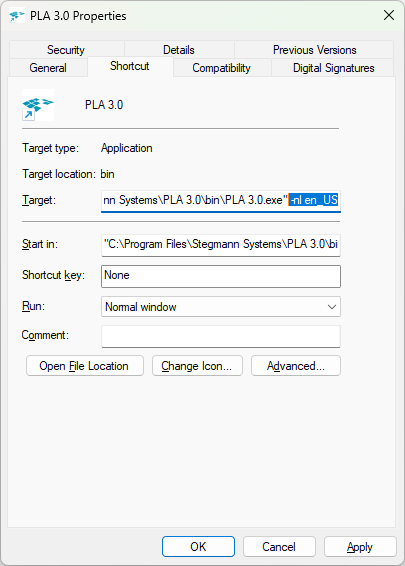
Figure 1. The Properties dialog of a PLA 3.0.exe desktop shortcut - To save and close the dialog, select OK.