
Filter options
A set of filter options lets you extend or shorten the list of displayed add-ons based on specific criteria.
Navigation:
System > Add-on management > filter symbol 
Add-on filter dialog
The dialog displays a list of filter criteria and lets you apply and remove them.
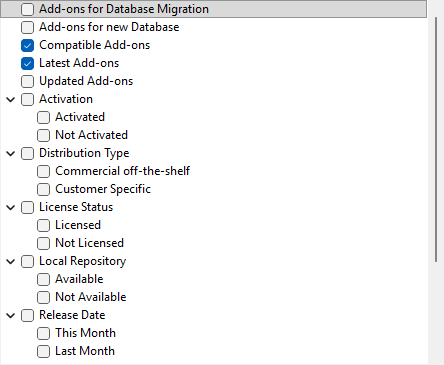
Available filters
| Filter | Description |
|---|---|
|
Add-ons for Database Migration |
If you are using a PLA version earlier than 3.0.5, you can migrate your packages to add-ons. When migrating to PLA 3.0.7, this checkbox is active. For details, see the 3. Migrate your packages to add-ons topic. |
|
Compatible Add-ons |
To see newer versions of add-ons that are not compatible with your version of PLA 3.0, clear the Latest Add-ons checkbox. |
|
Latest Add-ons |
To see older versions of add-ons, clear the Latest Add-ons checkbox. |
|
License Status group |
To see add-ons that you have not licensed and where you might be interested in a trial version, activate the Not Licensed checkbox. For details, see the Add-on trial topic. |
|
State group |
To see technical previews of the add-ons, activate the Draft checkbox in the State group. This allows you to evaluate add-ons before their actual release. Note:
To activate these add-ons, you need to activate the
Activate draft components
checkbox in the Advanced tab of the
Database Policies dialog. For
details, see the Advanced
topic. |