
Create templates from documents
Create templates from existing documents, for example to develop a standardized process from an existing assay.
About this task
Procedure
To create a template from an existing document:
- Open the document that you want to convert into a template.
- On the File menu, select Save as template.
-
In the Save template dialog, select a target folder to
save the template and confirm with OK.
Results: PLA 3.0 saves the new template and displays it in the document pane.
To remove annotations and observations:
-
Go to the Dashboard.
Results:
If the template has annotations, you see a message at the top of the dashboard. You also see the Remove annotations button in the action bar.
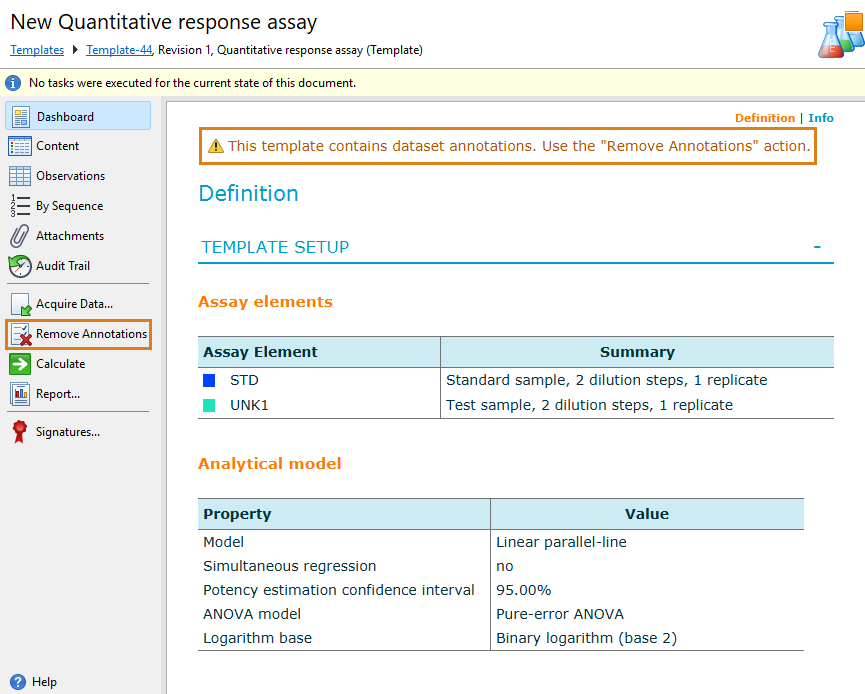
- Select Remove annotations.
- Select Yes to confirm the removal.
- Go to the Observations editor.
-
To remove all observation data, select all data columns and then select
 Remove.
To define protection settings:
-
Apply permissions and initial values to document elements.
For details, see the Protection settings topic.
-
Save the template.
Note:You can use the Content editor to change the document structure according to your requirements. For details on how to work with this editor, see the Content editor topic.