
Source files tab
Define the pattern of the file names and the expected file count.
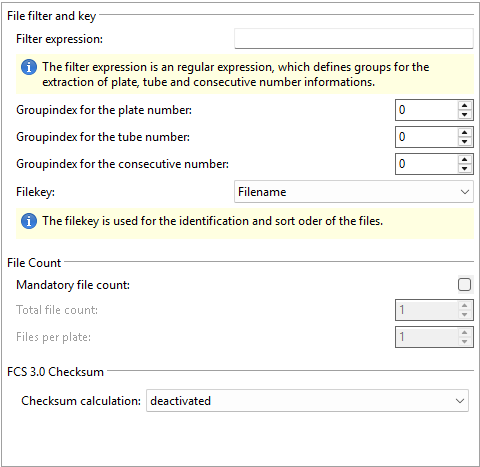
File filter and key
| Setting | Description |
|---|---|
|
File expression |
A regular expression to determine the accepted file names. The
file mask can contain regular expression groups to assign a file
to a plate and/or tube.
Note: For details on regular
expressions, see the Regular expressions topic. |
|
Groupindex for the plate number |
The group number within the regular expression that defines the plate number. If this value is 0, the files are not assigned to a plate. |
|
Groupindex for the tube number |
The group number within the regular expression that defines the tube number. If this value is 0, the files are not assigned to a tube. |
|
Groupindex for the consecutive number |
The group number within the regular expression that defines the consecutively numbered file number. If this value is 0, the files are not numbered consecutively. |
|
Filekey |
The method that is used to identify and sort the files to import. |
File count
| Setting | Description |
|---|---|
|
Mandatory file count |
If this option is activated, the FCS RetiCount Data Acquisition Module checks if the source folder contains the given total file count and cancels the process if there are more or fewer files. The total file count refers to the number of files that are accepted by the file mask. |
|
Total file count |
If more or fewer files are accepted by the regular expression, the data acquisition process is canceled. Note:
This setting is available only if you activated
the Mandatory file count setting. |
|
Files per plate |
Like the total file count, this setting helps you validate the specified files count. Note:
This setting is available only if you activated
the Mandatory file count setting. |
FCS 3.0 Checksum
| Setting | Description |
|---|---|
|
Checksum calculation |
The method you want to use to calculate the checksum of the files to import. The following options are available:
|