
General tab
Name the configuration profile and define an import strategy.
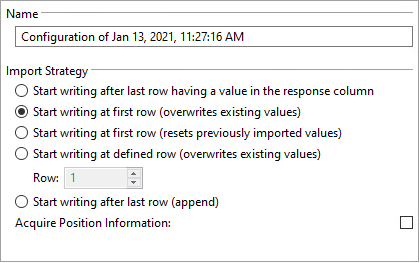
Name
The name of the configuration profile.
Import strategy
When you reacquire the same data or acquire a second dataset, you can use the import strategy to define how existing response values are handled in the data table of the Observations editor.
| Setting | Description |
|---|---|
|
Start writing after last row having a value in the response column |
Starts writing after the last row having a value in the response column. |
|
Start writing at first row (overwrites existing values) |
Starts writing at the first observation row, overwriting existing values. |
|
Start writing at first row (resets previously imported values) |
Starts writing at the first observation row, resetting previously imported values and manually defined technical outliers. |
|
Start writing at defined row (overwrites existing values) |
Starts writing in the specified observation row, overwriting existing values. |
|
Start writing after last row (append) |
Starts writing after the last observation row, keeping existing values. |
|
Acquire position information |
Generates plate and tube factor values if available. Important:
This setting is not yet available for all
data acquisition modules. |
-
The position factor for the plate needs the
com.stegmannsystems.edp.dataset.column.position.platecolumn key. -
The position factor for the tube needs the
com.stegmannsystems.edp.dataset.column.position.tubecolumn key. -
The position factor for the consecutive number needs the
com.stegmannsystems.edp.dataset.column.position.consecutivenumbercolumn key.