
Use legacy protection keys
We recommend software keys for license activation. However, you can also activate a PLA 3.0 license using a Sentinel HL USB dongle.
Note:
Aladdin USB dongles (hardlock keys) are no longer supported. You can
identify them by their color: blue (seat license) or green (concurrent use license). If
you are currently using this type of dongle, please contact ourSales team at sales@bioassay.de to discuss replacement
options.
Before you begin
-
Make sure you have administrative privileges.
-
Send an e-mail to our Sales team at sales@bioassay.de. You will receive a corresponding dongle and a PDF document with the required license keys.
The color of the dongle indicates the licensing option:
| Licensing option | Dongle color |
|---|---|
| Seat license | 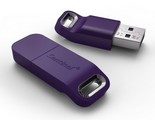 |
| Concurrent use license | 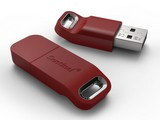 |
Procedure
To activate your PLA 3.0 license using a Sentinel HL USB
dongle:
-
Connect the dongle to the computer or license server that should be
licensed.
If you connect the dongle to the same computer as PLA 3.0 (Seat license), the required driver is installed during the PLA 3.0 installation.Tip:To use the dongle on a virtual machine, we recommend you connect it to the virtual machine using a network USB drive. If your environment is set up accordingly, you can also connect it using a physical USB port of the host.
Concurrent use license only:
- If you connect the dongle to a license server, download the PLA 3.0 license system setup file from https://www.bioassay.de/software. On this site, you have to fill in the form to access the download area. Run the setup file as administrator to install the required driver.