
Global roles
Combine database tasks into global roles and assign them to users and groups to control who can perform particular database tasks.
Navigation:
Default setup
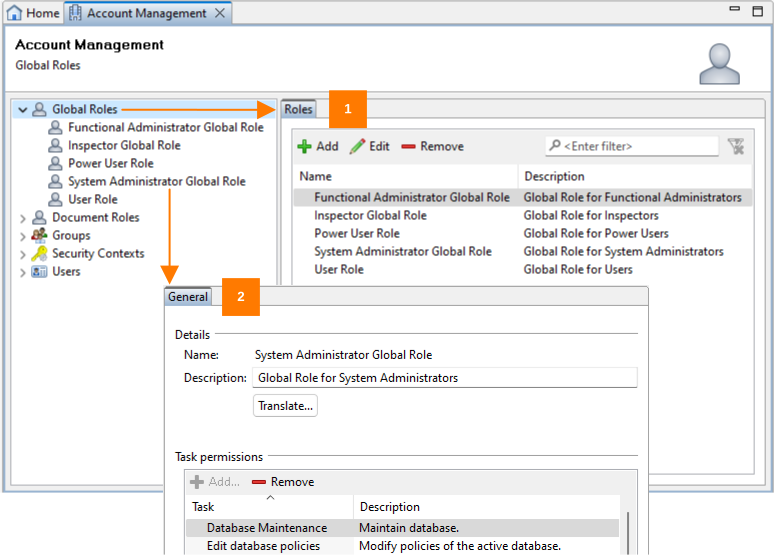
| No. | Description |
|---|---|
|
1 |
Select the top entry of the Global roles list to display the Roles tab, where you can create, modify, and delete global roles for the database. For details, see the Roles tab topic. |
|
2 |
Expand the Global roles list and select an entry to display the General tab, where you can assign and remove task permissions for this particular global role. For details, see the General tab topic. |
Default roles
| Role | Description |
|---|---|
|
Functional Administrator |
Functional administrators are responsible for the controlled configuration and functional management of PLA 3.0. They ensure that the system is configured and used according to defined processes and maintain the system's validated state from an application perspective. This role bridges technical administration and operational use, managing the functional environment without altering the underlying infrastructure. It is typically assigned to head of laboratory or senior research scientists. |
|
System Administrator |
System administrators are responsible for the technical maintenance and reliable operation of the PLA 3.0 environment. They manage the underlying infrastructure, including installation, database maintenance, and connectivity, ensuring that the system remains technically available and stable. This role focuses on sustaining the qualified platform from an IT perspective without modifying its functional configuration or analytical context. It is typically assigned to IT personnel. |
|
Power User |
Power users support qualification activities and act as advanced application users. This role combines operational access with limited administrative capabilities, allowing experienced users to assist in validation, testing, or complex analytical activities without full administrative privileges. This role is typically assigned to Senior Laboratory Technicians. |
|
User |
Users have standard access within the qualified environment. This role lets authorized personnel perform routine analytical work and interact with validated data according to defined permissions. This role is typically assigned to day-to-day operators of PLA 3.0. |
|
Inspector |
The Inspector role provides controlled, read-only access to the system. It is intended for quality or audit personnel who require independent review of data, configurations, and system activities without the ability to modify information. This role ensures transparent oversight of system use and compliance. It is typically assigned to Quality Assurance Specialists. |